Welcome to 'itsyour-site.blogspot.in'

Showing posts with label software. Show all posts

Thursday, 26 April 2012

JAVA and its related software Download

Thursday, 19 April 2012

RECOVER FILES FROM ANY DISK, PEN DRIVES AND CAMERA


Accidentally deleted wanted files? A virus has removed your documents? you  can get them back byData Recovery. it can recover files from Recycle Bin, Digital camera, Pen Drive and other storage media. You can Recover files even after you formatted your drive. This might not work properly with large file sizes. but you  can recover  pictures, Mp3 and documents easily. Data Recovery is very important if you work with important files. Basic  Data Recovery softwares only allows you to recover deleted files. But this software can recover iPod  music and your deleted E-mails also. Here you can see full software specification and Download links for the Full version.

Recuva Specifications from the official web site

* Recover from  damaged  and formatted  Disks 
* Undelete files on your computer
* Recover deleted E-mails ( Supports Outlook Express, Mozilla thunder bird, Windows Live mail..... )
* Recover Deleted iPod Music
* Restore unsaved Word documetns
* Support  fot all windows versions  and 37+ Languages
* Deep scan  feature to search and recover very old files
* Easy to use Qucik start  wizard


Download Full version From here


DOWNLOAD

CONVERT POWER POINT PRESENTATIONS TO ANY FILE FORMAT FREE


PowerPoint is a very popular software. It comes with Microsoft office. You can make quality and beautiful presentations using PowerPoint. PowerPoint Presentations can be viewed on  other computers using ppt file format. But when you needed to upload your presentation to you tube or if you want to watch it on your TV you gonna have to convert those presentation to a video format. In this post I'm gonna give you a Full version of a Power Point 2 Video Converter. There are lots of Versions of Power Point 2 Video Converters available on internet. This is the easiest and The best software. lets see what are the advantage of this software. you can download the full version from this page

You can make your own Greeting messages, Birthday wishes and your all needs using Power Point. This software will help you to convert that file to a video.
*Convert PPT to video formats: AVI, H.264, WMV, MP4, MOV, etc.
*HD-format videos also supported: HD AVI, HD H.264, and HD MPEG-2 TS
*Make video presentations playable on iPod, iPhone, PSP and BlackBerry
*Share PowerPoint videos on YouTube or other video sharing site
*The Pro version allows adding watermark to video presentation


PowerPoint Video Output Customization
*Adjust settings and parameters for a customized PowerPoint video
*Attach Watermark to Your Video
*Add your company's trademark to your videos to protect your presentations from being used or distributed illegally.
*Optimize PowerPoint Video
*Set slide playback time interval, add background music or sound effects for a personalized presentation video.
*Multiple Output Solutions
*Create as many output videos with different settings as you like, so you can play them on different devices.
*Set Output Parameters
*Tweaking the resolution, video quality, frame rate and other parameters is available, enabling you to create a custom presentation video.

Simple to Use
No need to learn the complex terms in coding or multimedia editing.
Xilisoft PowerPoint to Video Converter does the job for you!

DOWNLOAD

Tuesday, 10 April 2012

Internet Download Manager Serial Number Free


Internet Download Manager Serial Number Free


IDM free serial number is one alone solution for:

how to register internet download manager idm fake serial number
internet download manager serial number free download
idm fake serial number error
solution for internet download manager fake serial number error
idm serial key for registration
idm free serial number
serial number idm free download
serial number of idm
serial number idm free
serial number idm registration
idm serial number for free registration
idm serial number for free download
idm serial number for registration free download
idm serial number free 2012
idm 6.07 serial number
idm serial number for 6.08
idm serial number for latest 5.18
idm serial number for 5.19
idm serial number for 6.04
idm serial number for 6.05
idm serial number for 6.06
idm serial number for 6.07
idm serial number for 6.08
idm serial number for 6.5
idm serial number free download full version
idm serial number free download crack

Only one solution provided here by Click Here

IDM Free Download 6.08 Final Full Version Latest


IDM Free Download 6.08 Final Full Version Latest

Internet Download Manager IDM Registered Full & Final Version Latest is now available at http://learnhackz.blogspot.com for free download.

Internet Download Manager IDM Registered Full & Final Version Latest is available for Windows XP, Windows 7 and Windows Vista with registered version.

Internet Download Manager IDM Registered Full & Final Version Latestintegrates the support for Google Chrome, Mozilla Firefox and Internet Explorer Latest Versions.

IDM Latest Internet Download Manager Registered Full Final Versionincrease the downloading speed upto 5 times.

Step by Step Guide "How to solve IDM fake serial Number Error or idm full registered version free download:

Note: Uninstall any previous version if installed then restart your pc before doing this.

Step 1. Install "idman608 Build 9" from downloaded and extracted folder.

Step 2. After installing, In the System Tray Locate Internet Download Manager Icon then right click on it and select "Exit" to close it.

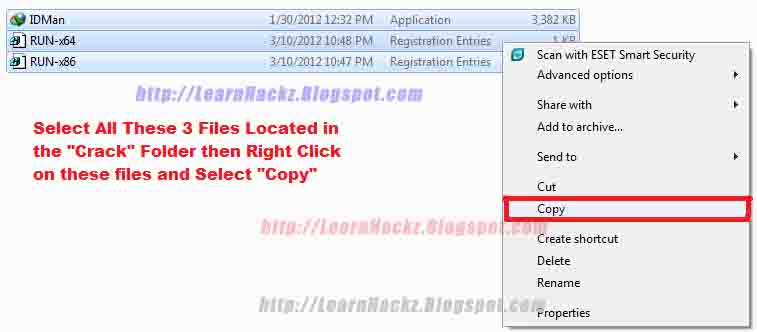
Step 3. Now Select All These 3 Files ("IDMan.exe" "Run-X86" and "RUN-x64") Located in the "Crack" Folder then Right Click on these files and Select "Copy".

Step 4. Go to "C:\Program Files\Internet Download Manager" or where you installed it,

Right Click and select "Paste" into the installed directory.


Step 5. Select "Copy and Replace" (Tick Do This for all files) in windows 7 and vista and in XP select "Yes" to get success.

Note: IF error (Close the folder or file and try again" appears you must complete the "Step 2" before doing this.

Step 6 . For 32-bit or X86 Users. (Operating System Type)
Double Click on "RUN-x86" file, an box appears with the title of "Registry Editor" and asking you that "Are you sure you want to continue?" You must select "Yes" to complete.

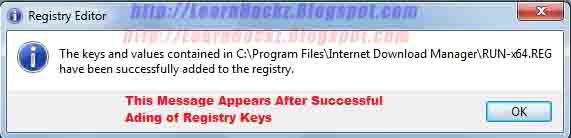
After that Registry Editor says "keys added successfully" now Click "OK"

Step 6 . For 64-bit Users. (Operating System Type)
Double Click on "RUN-x64" file, an box appears with the title of "Registry Editor" and asking you that "Are you sure you want to continue?" You must select "Yes" to complete.

After that Registry Editor says "keys added successfully" now Click "OK"

Note: These Two files depends on your operating system type where it was32bit or 64bit.
How to check operating your system type:
Click Start and select Run.
Type "msinfo32.exe" in run and press enter.
Now locate your "System Type" in system summary.

Step 7. Open IDMan.exe program or its shortcut, click the Help from the filemenu and select "About IDM". Here you see its registered for free.

Credits...

http://learnhackz.blogspot.com/

http://urgentdownloads.blogspot.com/

IDM 6.10 Crack Full Version Free Download


IDM 6.10 Crack Full Version Free Download


IDM_6.10_Crack_Full_Version_Free_Download Internet Download Manager with crack and serial number is a free downloader used to download youtube videos, softwares, applications, mp3 files, and many other data types.


Internet Download Manager IDM 6.10 Crack Full Version Free Download has many latest features for 2012 latest version.


First you should download winrar from here to extract the attached file.


Installation Guide:


Step 1. Install "idman610f".


Step 2. Close Internet Download Manager from system Tray Icon.
(Right click on icon of idm and select exit)


Step 3. Then copy "IDMan.exe" file to \Program Files\Internet Download Manager or where you installed it then select confirm overwrite.


Step 4. Now open RUN-x86.REG or RUN-x64.REG files.


Note: Thsese files depends on your operating system where it was 32bit or 64bit.


Step 5. Press Yes in dialogue message and then OK.


Registration Details:


First Name : chandra babu
Last Name  : naidu
Email      : acbnaidu1@gmail.com
Serial     : 4MQJX-8S7LS-J2FQL-1425C

How to update offline Panda Internet Security 2010?


How to update offline Panda Internet Security 2010?

           As we know that antivirus software need to update from time to time. You now installed Panda Internet Security 2010. And it was outdate. But you can not connect to the Internet. So how to update offline Panda Internet Security 2010?

         Panda Internet Security 2010 is a security suite that lets you use the Internet with complete peace of mind. It protects you from viruses, spyware, rootkits, hackers, online fraud, identity theft and all other Internet threats. The anti-spam engine will keep your inbox free from junk mail while the Parental Control feature ensures your children can use the Web safely. And thanks to the new Collective Intelligence technology, the solution is now much faster than previous versions.

Step by Step guide on upgrading Panda Internet Security 2010 offline.

 
Step 1: Make sure you have to hand the activation code you got on buying the product. And you have installed the program.
Step 2: Go to main window of Panda Interne Security. Click Settings in theUpdates panel.
Update pannel 
Step 3: From the pannel of Update location select CD ROM / DVD or Local network.
Update offline 
Step 4: Click the folder button and find the drive or path from which you want to update.
Step 5: Once the updates are complete, click" OK".
OK, your Panda Internet Security 2010 has been upgraded until now. By this guide on how to update offline Panda Internet Security 2010, you can get the idea tha t upgrade Panda Internet Security 2010 by CD ROM / DVD . So next time, the program is outdate you also can upgrade it.

How to use norton ghost-2003

How to use norton ghost-2003

Here are the step by step information on the usage of this super tool:
1. Keep the ghost executable file on your dos bootable cd or any fat 32 partition – MS DOS do not support NTFS file system. Turn your system on with DOS – the one which could be found while installing Windows 98/Me. You may use bootable disks for dos.
2. Navigate into the directory where you have placed the ghost.exe file and type ghost and hit enter.
3. You will get a welcome screen, just hit enter. After a welcome screen, you will get a screen like this where you have to select the type of task to be done. The main tasks available are:

  • Disk to disk copy
  • Disk to image copy
  • Image to disk copy
  • Partition to partition copy
  • Partition to image
  • Image to partition

ghost-1.gif

4. Select the hard disk which is the source of your data. In this image, you can notice only one hard disk which has been installed on my system. If you have multiple harddisks, you need to select carefully. Based on the operation you have selected in the step 3, further screens may differ.

ghost-2.gif

5. The following are the images for backing up a partition. Select the partition you need to backup, I have chosen C drive for this purpose.

ghost-3.gif

6. Select the destination to store the image file. The destination should be a non source partition. Provide a file name, a description if needed and save.

ghost-4.gif

7. You will be prompted to use compression, you may choose as it saves your disk space and also its safe. You will be presented with a progress screen like this and all the job is over after this. The total process hardly takes some 5 minutes for a partition with 3GB of data on a 80 GB hard disk with 256MB of RAM. The performance may vary for different systems.

ghost-5.gif

8. Use similar steps to restore a partition from an image. Very simple steps are involved in the whole process and it is recommended that you backup your OS drive as it has the maximum chances of corruption.
Note: Throughout the process, you will not be having mouse support. Use Tab, Enter, Arrow keys for operations and keyboard works normally.
You may download the ghost software here.


DOWNLOAD

http://www.oldversion.com/Norton_Ghost.html

How to download Panda Antivirus Pro free


          How to download Panda Antivirus Pro free


        Panda Antivirus Pro 2010 is the easiest-to-use and most intuitive protection for your computer. Just install it and forget about viruses, spyware, rootkits, hackers, online fraud and identity theft. Chat, share photos and videos, bank and buy online, read your favorite blogs or simply surf the Web, with complete peace of mind. And thanks to the new Collective Intelligence technology, the solution is now much faster than previous versions.

Guide on how to download Panda Antivirus Pro 2010 free.


        Panda Antivirus Pro 2010 automatically detects and eliminates viruses, spyware, Trojans, rootkits, bots and other malware before which infect your computer. Panda USB Vaccine protects your USB drives from infection. It new technologies are widely recognized as the most effective against new and unknown malware. Besides, Personal Firewall protects you against Internet-borne worms and hacker. attacks. In additional, with Anti-Banking Trojan Engine, it detects the most dangerous identity theft malware used by cyber-criminals to steal banking credentials. Specialized heuristics and generic detection techniques ensure maximum protection for online transactions.
Click here to download Panda Antivirus Pro 2010:
 

http://www.downloadatoz.com/utility_directory/panda-internet-security-2010/

Operating System:
- Windows XP 32-bit
- Windows Vista 32 and 64-bit
Processor: Pentium 300 MHz or faster
RAM:
- 128 MB without TruPrevent
- 512 MB with TruPrevent (1 GB recommended)
Hard Disk: 275 MB free space
MS Internet Explorer 6.0
CD-ROM drive 


              Ok, you get the knowlegde of Panda Antivirus Pro 2010, and downloaded it. You just click it to install, then you get the permit to use it. Follow this guide you get to know how to download Panda Antivirus Pro 2010, you can do the same steps as this guide instructs, to download other software what you need.

How-to-activate-panda-antivirus-pro


How-to-activate-panda-antivirus-pro


Panda Internet Security 2010 can protect your PC from many of millious viruses. It is essential to activate Panda Antivirus Pro 2010 in order to benefit from the following services, such as Daily automatic updates, use technical support and SOS Virus. But how to activate Panda Antivirus Pro 2010?

Panda Antivirus Pro 2010 is the most intuitive protection for your computer. Just install it and forget about viruses, spyware, rootkits, hackers, online fraud and identity theft. Chat, share photos and videos, bank and buy online, read your favorite blogs or simply surf the Web, with complete peace of mind. And thanks to the new Collective Intelligence technology, the solution is now much faster than previous versions.

Guide on how to activate Panda Antivirus Pro

 
Step 1: Make sure you have to hand the activation code you got on buying the product.
Step 2: Double-click the Panda Antivirus Pro 2010 icon in the Windows taskbar (next to the system clock).
Step 3: In the top right corner of the Panda Antivirus Pro 2010 window, click "Help", choose Activate the product.
Activate Panda Antivirus Pro 2010 
Step 4: You will then see a simple wizard which will allow you to activate Panda Antivirus Pro 2010. Simply click "Next" and enter the details as requested.
Activate wizard 
Step 5: Wait for a moment, then click "Finish".
Now, you have done all of the things to activate Panda Antivirus Pro 2010. The Panda Antivirus Pro 2010 has been activated. Following this guide on how to activate Panda Antivirus Pro 2010, you get the knowledge of steps activating Panda Internet Security 2010.